Beta Blogger
Recently, I decided to make the switch from Blogger to Beta Blogger. The lure was the ability to add labels to posts. This is a feature that I've been mimicking by having a drop-down menu in my sidebar called "Series Archive" but this has been far from ideal.
Unfortunately, once you've made the move to Beta Blogger, there's no going back.
To be able to use the labelling feature of Beta Blogger, one has to "customize" one's template (i.e. choose a template, then re-customize it to resemble what you had before). I don't mind doing this, but the problem was that the line height of the text varied between paragraphs for no reason that I could make out.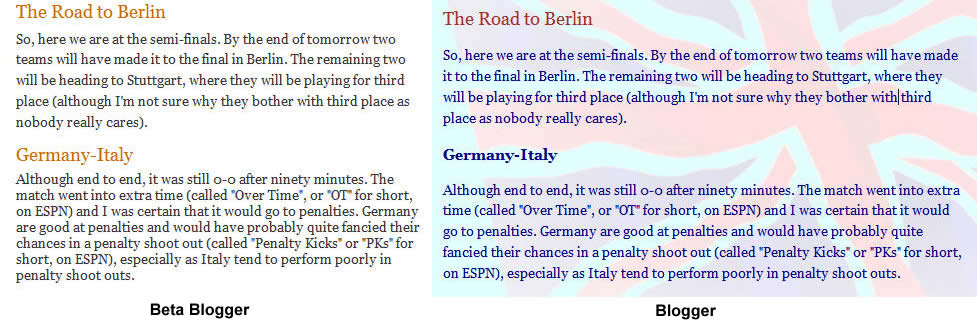
Here's what Blogger have to say about it:
I gather from this that "just cosmetic" issues are not top priority.
I resorted to reverting to my old template. (Although one can't revert to the tried and tested alpha version of blogger, one can upload the old template). Unfortunately, though, all of the old template's functionality is not available in Beta Blogger. The "Previous Posts" section only lists the twelve most recent posts. Previously, one could click on a post and the twelve "Previous Posts" listed would be relative to the post being viewed. The search box also fails to find older posts.
Now that I'm using my old template on Beta Blogger, the only way to access older posts is via the "Main Archive" drop-down menu. This only shows posts by month, without the option of viewing individual entries.
Beta Blogger does have better archiving options -- one can have a list, a drop-down box or a hierarchical structure. Although nice, it is not very customizable, so they need to work on that a bit more too.
So, if you're wondering what's wrong with my blog at the moment, it's teething problems with Beta Blogger. Hopefully, the problems will get ironed out eventually. I apologise for this and if I could go back, I would.
By the way, if you have any input into my Beta Blogger problems (i.e. if there's something I can do to sort out the text line spacing without having to wait for Blogger's support team), please let me know.
October 10.2006
I'm outlining the problem with the line spacing and possible solutions for posterity, in the hope that it may be of help to anyone else who has had this same problem. This problem and solution is specific to the various incarnations of the Minima template only.The problem is that when one types one's post into blogger, carriage returns are interpreted as breaks, not paragraphs. This means that the entire post is treated by the browser as one big paragraph. My problem was that I had been using div tags to float images with their captions underneath. This use of div tags within the mega-paragraph that forms the post would break the mega-paragraph and the styles would no longer apply.
The style for the post body is defined by a div tag with "class='post-body'". The line spacing for the mega-paragraph is defined in the style sheet by "'post p'".
Solutions are:
- Go to each div tag and change it to "span" (very time-consuming and boring)
- Encase each paragraph in p tags (also very time-consuming and boring)
- Make the "post p" style apply to "post-body" by changing the style sheet line ".post p {" to read something like ".post-body, .post p {".














































 Subscribe via Feedburner
